Step by Step Submission
New Submission Guidelines for Authors
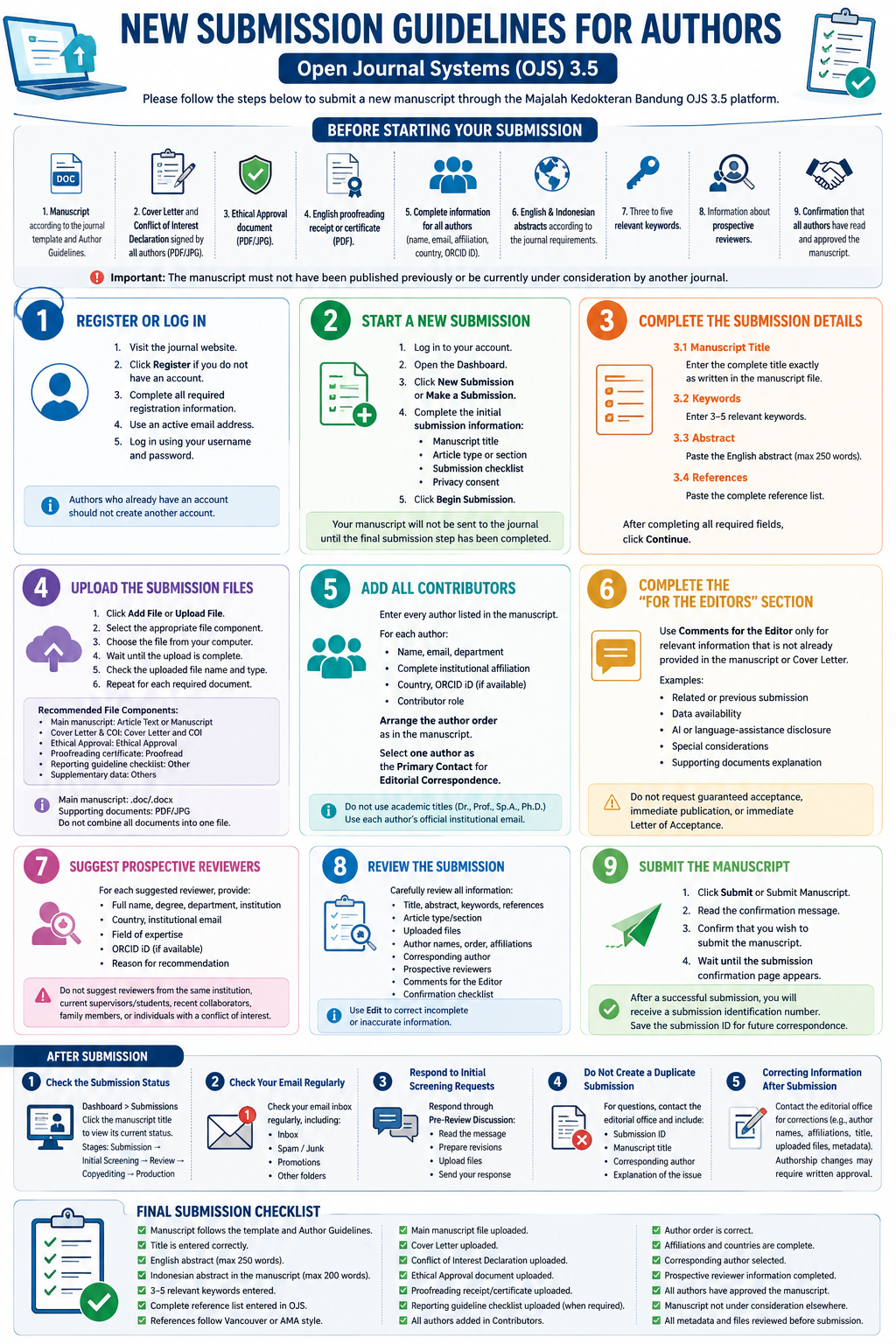
Please follow the steps below to submit your manuscript through the journal’s OJS 3.5 platform.
Before Submission
Please prepare:
- Manuscript in Microsoft Word format according to the journal template.
- Cover Letter and Conflict of Interest Declaration signed by all authors.
- Ethical Approval document.
- English proofreading receipt or certificate.
- Complete information for all authors.
- English and Indonesian abstracts.
- Three to five keywords.
- Information about prospective reviewers.
The manuscript must not be published previously or currently submitted to another journal.
1. Register or Log In
Visit the journal website and click Register if you do not have an account.
Complete the required information using an active email address. Authors who already have an account should not create a new account.
After registration, log in to your account.
2. Start a New Submission
From the Dashboard, click New Submission or Make a Submission.
Complete the following initial information:
- Manuscript title
- Article type or section
- Submission checklist
- Privacy consent
Click Begin Submission.
3. Complete the Submission Details
Enter the following manuscript information:
Title
Enter the complete title exactly as written in the manuscript. Do not use all capital letters.
Keywords
Enter three to five relevant keywords. MeSH terms are recommended.
Abstract
Enter the English abstract in an unstructured format with a maximum of 250 words.
The Indonesian abstract, with a maximum of 200 words, must be included in the manuscript file.
References
Copy and paste the complete reference list into the References field.
References should:
-
Follow Vancouver or AMA style.
-
Be numbered according to their appearance in the manuscript.
-
Include 10–25 references.
-
Preferably be published within the last 10 years.
-
Consist of at least 80% journal articles.
Click Continue.
4. Upload the Files
Upload each document using the appropriate file component:
| Document | File Component |
|---|---|
| Main manuscript | Article Text or Manuscript |
| Cover Letter and Conflict of Interest | Cover Letter and Conflict of Interest |
| Ethical Approval | Ethical Approval |
| Proofreading certificate | Proofread |
| Reporting guideline checklist | Other |
| Supplementary data | Others |
The manuscript must be uploaded in .doc or .docx format.
Supporting documents should be uploaded in PDF or JPG format.
Do not combine all documents into one file. Use clear filenames and ensure that every uploaded document is readable.
Click Continue.
5. Add All Contributors
Add every author listed in the manuscript to the Contributors section.
Complete the following information for each author:
-
Given name and family name
-
Active email address
-
Department and institutional affiliation
-
Country
-
ORCID iD, when available
-
Contributor role
The author names, affiliations, and order must be identical to those in the manuscript.
Select one author as the Primary Contact for Editorial Correspondence.
Do not use one email address for several authors and do not include academic titles in the author name fields.
Click Continue.
6. Complete the “For the Editors” Section
Use the Comments for the Editor field only for relevant information, such as:
-
Information about a related or previous submission
-
Data availability
-
Supporting document explanations
-
Special considerations
-
Disclosure of AI or language-assistance tools
Do not use this field to request guaranteed acceptance or immediate publication.
Click Continue.
7. Suggest Prospective Reviewers
Provide the following information for each suggested reviewer:
-
Full name
-
Department and institution
-
Country
-
Institutional email address
-
Field of expertise
-
ORCID iD or researcher profile, when available
-
Reason for the recommendation
Suggested reviewers must:
-
Have expertise related to the manuscript.
-
Be from a different institution.
-
Have no conflict of interest.
-
Not be a recent co-author or collaborator.
-
Have an active institutional email address.
The editorial team may appoint different reviewers.
Click Continue.
8. Review and Submit
Before submitting, check:
-
Manuscript title
-
Abstract and keywords
-
References
-
Uploaded files
-
Author names and order
-
Affiliations and countries
-
Primary Contact
-
Prospective reviewers
-
Comments for the Editor
-
Submission checklist
Use the Edit button if corrections are needed.
When all information is correct, click Submit or Submit Manuscript and confirm the submission.
Save the submission ID for future correspondence.
After Submission
To check the manuscript status:
-
Log in to the journal website.
-
Open the Dashboard.
-
Select Submissions.
-
Click the manuscript title.
Please check your email, spam, junk, and promotions folders regularly.
If the editorial team requests corrections during initial screening, submit the revised files and response through the Pre-Review Discussion.
Do not create a duplicate submission if the manuscript status has not changed.
For corrections to author names, author order, affiliations, manuscript title, or uploaded files, contact the editorial office and include the submission ID.
Download here for the complete guide.